Robot Development Extensions for URDF
This Visual Studio Code extension helps you buid Universal Robot Description Format (URDF) files for your robot. This extension does not require ROS to be installed in order to edit and visualize URDF files.
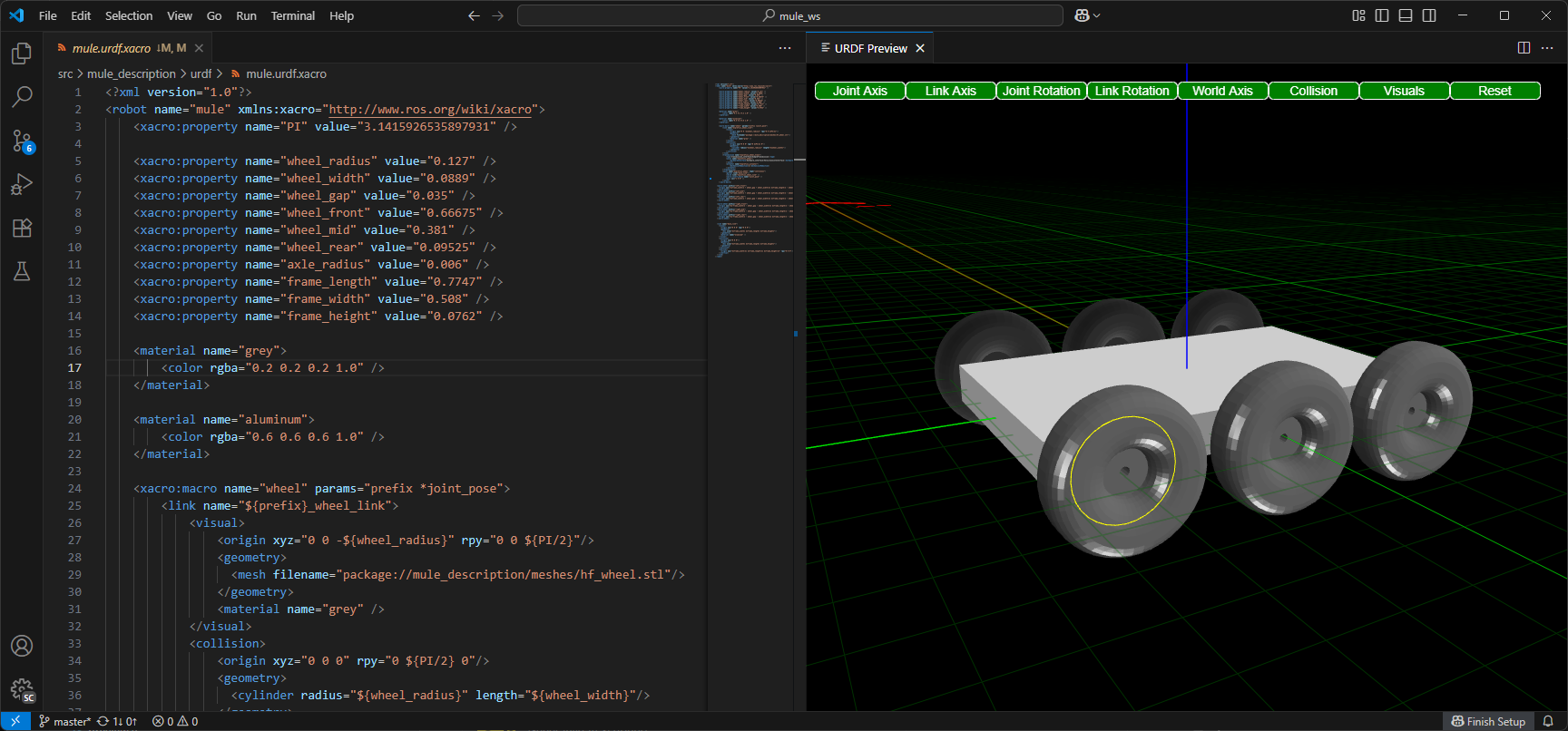
Features
Core Editing & Visualization
- 3D Preview: Real-time rendering with BabylonJS engine
- Link & Joint Visualization: Visual representation of robot structure with axis and rotation parameters
- Collision Geometries: Toggle between visual and collision geometry display
- Joint Explosion: "Explode" joints to see internal structure
- Interactive Controls: Camera controls, rotation gizmos, and axis visualization
- Export to Isaac Simulation: Direct export for NVIDIA Isaac Sim
IntelliSense & Navigation
- Go to Definition (F12):
- Jump to URDF links, joints, xacro macros, and properties
- Navigate to OpenSCAD modules and functions across files
- Resolve package paths and mesh file references
- Cross-file symbol resolution via includes
- Smart Hover Documentation:
- URDF/Xacro elements with full XML signatures and inline attributes
- OpenSCAD modules/functions with parameter descriptions from comments
- Built-in element documentation with types, defaults, and units
- Source file location for imported definitions
- Code Completion:
- URDF/Xacro element snippets with intelligent placeholders
- OpenSCAD built-in functions and transformations
- Xacro property reference completion (
${}) - Contextual suggestions based on cursor position
- Schema Validation: Real-time XML schema validation
OpenSCAD Support
- OpenSCAD Rendering: Full support for programmatically creating robot parts
- Integrated Editing: Syntax highlighting and IntelliSense
- Live Preview: Automatic STL conversion and 3D rendering
- Export Menu: Export STL, Export SVG, or batch Export Parts, with optional profiles and a workspace-relative output directory
- Library Management: Automatic discovery from workspace and system paths
- Documentation Generation: Extract module/function docs from comments
AI-Assisted Development
- GitHub Copilot Integration: Custom prompts for URDF/Xacro/OpenSCAD
- AI Skills: Included skills, specialized agents, example prompts, and visual validation workflows
- MCP Server: Model Context Protocol for AI visual verification
- Screenshot capture of 3D previews
- OpenSCAD library documentation access
- Visual feedback loop for code generation
- Vibe Coding: AI can see rendered output and suggest improvements
Virtual Reality
- WebXR Preview: Immersive VR viewing and interactive exploration
Coming soon
Quick Start
- Open a URDF, .xacro, or OpenSCAD file
- Right-click and select "Preview" or press
Ctrl+Shift+P→ "URDF: Preview" - Use F12 (Go to Definition) on any link, joint, or module name to navigate
- Hover over elements to see inline documentation with parameters
Navigation Tips
- F12 on link/joint names → Jump to definition
- F12 on xacro macro calls → Jump to macro definition
- F12 on OpenSCAD module calls → Jump to module (even in libraries)
- F12 on file paths (package://, mesh files) → Open the referenced file
- Hover on elements → See full signature with parameters and types
- Ctrl+Space → Trigger IntelliSense completion
Configuration
See the Configuration Guide for detailed setup options including ROS package paths, OpenSCAD libraries, and visual customization.
Acknowledgements
This extension is rebranded and re-released by Ranch Hand Robotics, owned by the maintainer of the ms-iot VSCode ROS Extension with permission from Microsoft. The source extension was split into 3 parts - ROS 1, ROS 2 and a URDF editor.